


New Option to Help Build Policies Based on Sensitive Information Types
Message Center notification MC1235742 (published 20 February 2026, Microsoft 365 roadmap item 557554) describes a new Microsoft Purview Data Loss Prevention (DLP) option designed to help administrators understand how the sensitive information types (SITs) used in DLP policies are picked up in files. The idea is that all organizations have examples of files that contain information they’d really prefer not to be shared externally. By testing these files against one or all SITs, they can discover which SITs they should use in rules in DLP policies to detect potential leakage violations.
The feature is already rolling out in public preview to targeted release Microsoft 365 tenants. Microsoft anticipates that general availability should follow in late March 2026 with full worldwide deployment complete in late April 2026.
Standard Sensitive Information Types
Microsoft 365 currently has more than 300 standard sensitive information type definitions. The standard SITs cover a very wide range of data types found across the world from passport numbers to bank account numbers. Credit card numbers are the classic example. Microsoft has refined the definitions used by SITs over the years to improve their reliability and address issues with mismatches that sometimes happened in the early days (like this example).
If necessary, individual tenants can create their own sensitive information type by defining patterns or through a process of document fingerprinting to allow Purview to detect occurrences.
Testing Files Against Sensitive Information Types
Test is a new option in the Sensitive Info Types section of the Purview Data Loss Prevention solution. It can be used to test a selected SIT or all available SITs against the content of a file that’s uploaded to Purview. The maximum file size for testing is 2.5 MB. A scan against all available SITs is a good way to identify what’s in a file. Once you have a list of SITs found in a file, you can perform more granular testing to determine the best SIT or SITs to check for in DLP rules.
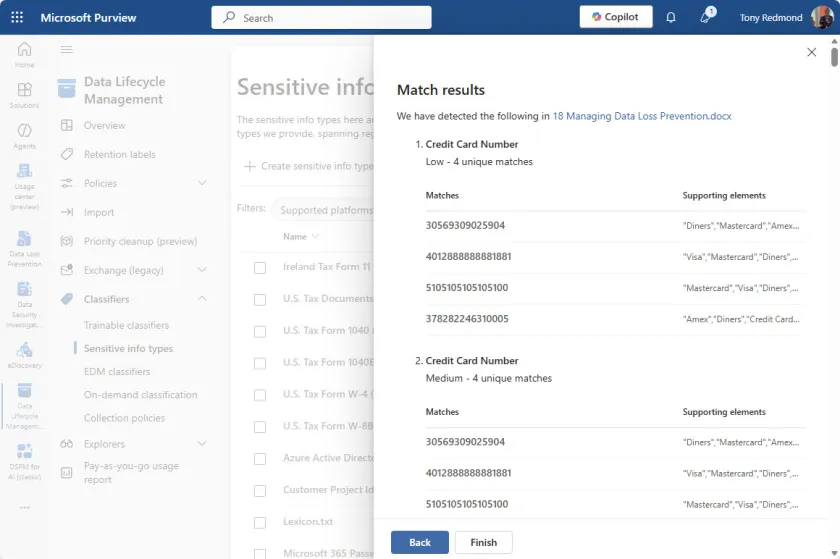
In Figure 1, I uploaded the Word document for the DLP chapter from the Office 365 for IT Pros eBook for testing. After a couple of seconds, Purview responded with a set of match results. As you’d expect from a chapter covering DLP, Purview found many matches in the file, including the credit card numbers shown in Figure 1. From this result we can conclude that the file will match against a DLP rule that checks for credit card numbers.

Whether DLP reports and acts on a policy violation depends on the number of occurrences in the file and the thresholds defined for the rule. We can see that 4 low and 4 medium confidence matches exist, so a rule that looks for four or more matches will report a violation and invoke the actions defined by the policy.
Testing SITs Makes DLP Easier
DLP is a critical defense mechanism in the Purview portfolio. Not only can DLP policies stop inadvertent (or sometimes absolutely intentional) leakage of confidential information to external parties, the DLP policy for Copilot is an important method for stopping Microsoft 365 Copilot from reusing sensitive emails and files in AI-generated responses. If you have the necessary licenses (Office 365 E3 and above, or E5 for Teams and Copilot), DLP is a solution to pay attention to and deploy. Being able to test files against SITs makes that task a little easier.
Insight like this doesn’t come easily. You’ve got to know the technology and understand how to look behind the scenes. Benefit from the knowledge and experience of the Office 365 for IT Pros team by subscribing to the best eBook covering Office 365 and the wider Microsoft 365 ecosystem.
