


been so surprised by how fast individual builders can now ship real and useful prototypes.
Tools like Claude Code, Google AntiGravity, and the growing ecosystem around them have crossed a threshold: you can inspect what others are building online and realize just how fast you can build today.
Over the past weeks, I’ve started reserving one to two hours a day exclusively for building with my AI-first stack:
- Google AntiGravity
- Google Gemini Pro
- Claude models accessed through AntiGravity
This setup has fundamentally changed how I think about prototyping, iteration speed, and what a “personal AI agent” can realistically do today. More importantly, it pulled me back into hands-on coding and building, something I had personally sacrificed once my role at DareData shifted toward management and orchestration rather than execution.
Individually, this revolution has been a blessing someone who was always going to drift toward management roles. It removes the trade-off I had accepted: that growing a company meant abandoning building entirely. I no longer have to choose between building and managing, they actually reinforce each other.
But, there is a broader implication here for people who are “just” developing. If AI agents increasingly handle execution, then pure implementation stops being enough. Developers will be pushed (whether they want it or not) toward coordination, decision-making, and.. management — something that individual contributors hate by heart. In other words, management skills become part of the technical stack, and AI agents are part of the context being managed.
What surprised me most is how transferable my existing management skills turned out to be:
- Guiding the agent rather than micromanaging it
- Asking for outcomes instead of instructions
- Mapping, prioritizing, and pointing the grey areas
In practice, I am managing and coordinating a virtual employee. I can deeply influence some parts of its work while remaining almost entirely ignorant of others — and that is not a bug, it is a big feature. In my personal AI assistant, for example, I can reason clearly about the backend, yet remain mostly clueless about the frontend. The system still works, because my role is no longer to know everything, but to steer the system in the right direction.
This is directly analogous to how I coordinate people inside the company. As DareData grows, we do not hire replicas of founders. We intentionally hire people who can do things we cannot do, and, over time, things we will never learn deeply enough to do well.

Enough self-reflection on management. Let’s look at what I’m building because that’s what you are here for:
- A personal AI assistant designed around my actual routines, not a generic productivity template. It adapts to how I work, think, and make decisions.
- A mobile app that recommends one music album per week, without a traditional recommendation system. No comfort-zone reinforcement and that helps me expand my listening zones.
- A mobile game built around a single character progressing through layered dungeons, developed primarily as a creative playground rather than a commercial product.
The interesting part is that, while I’m comfortable coding most of the backend, front-end development is not a skill I have — and if I were forced to do it myself, these projects would slow down from hours to days, or simply never ship.
That constraint is now largely irrelevant. With this new stack, imagination becomes the real bottleneck. The cost of “not knowing” an entire layer has collapsed.
So, in the rest of this post, I’ll walk through my personal AI assistant: what it does, how it’s structured, and why it works for me. My goal is to open-source it once it stabilizes, so others can adapt it to their own workflows. It is currently very specific to my life, but that specificity is intentional, and making it more general is part of the experiment.
Meet Fernão
Fernão Lopes was a chronicler of the Portuguese monarchy. I chose a Portuguese historical figure deliberately — Portuguese people have a habit of attaching historical names to almost anything. If that sounds stereotypically Portuguese, that’s intentional.
Fernão is Portuguese but actually speaks English, call it a modern day chronicler for the 21st century.
At this point, I’m doing two things I usually avoid: anthropomorphizing AI and leaning into a very Portuguese naming instinct. Consider it a harmless sign of me turning older.
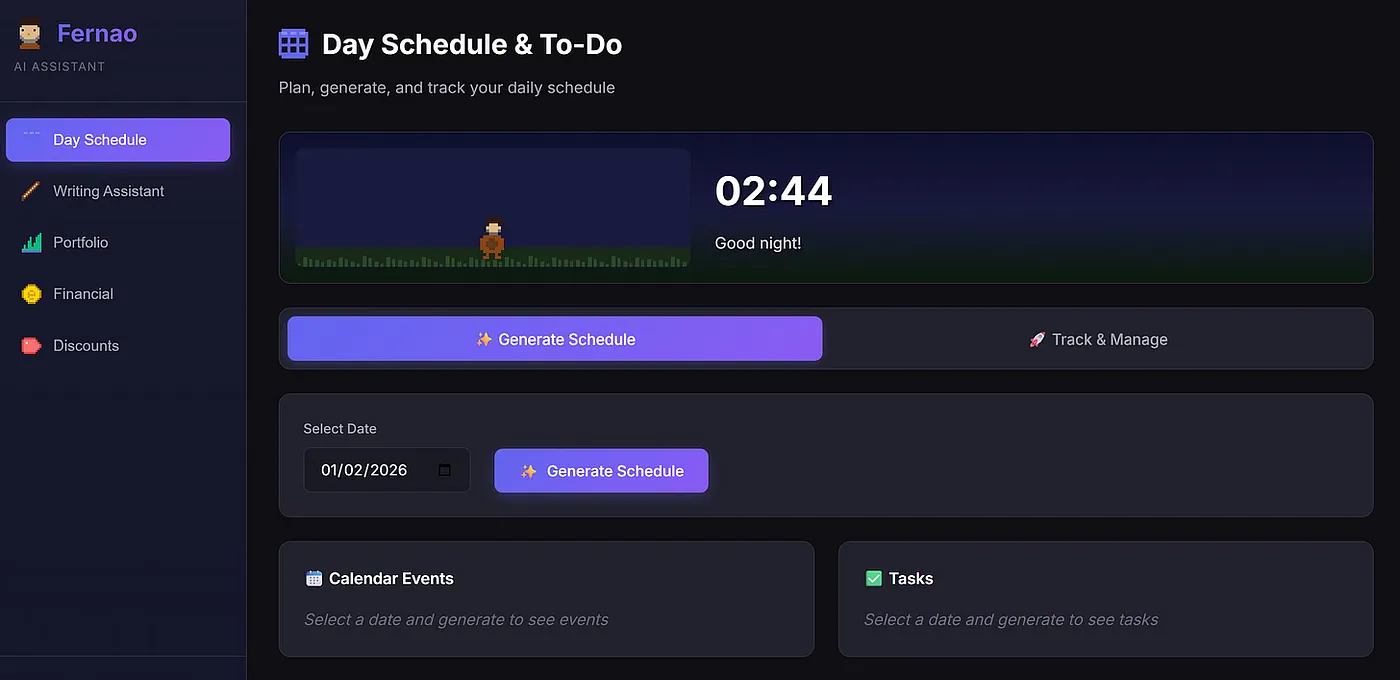
That aside, what does Fernão actually do for me? The best place to start is his front page.
Fernão is a cool-looking dude who currently handles five tasks:
- Day Schedule: plans my day by pulling together calendars, to-dos, and objectives, then turning them into something I can follow.
- Writing Assistant: helps me review and clean up drafts of blog posts and other texts.
- Portfolio Helper: suggests companies or ETFs to add based on rebalancing needs and what’s going on in the macro world (without pretending to be a crystal ball).
- Financial Organizer: extracts spending from my bank statements and uploads everything into the Cashew app, saving me from yet another task that took me about 3 to 4 hours monthly.
- Subscriptions & Discounts: keeps track of all my subscriptions and surfaces discounts or benefits I probably have but never remember to use.
In this post, I’ll focus on the Day Schedule app.
At the moment, Fernão’s Day Schedule does three simple things:
- Fetches my calendar, including all scheduled meetings
- Pulls my to-dos from Microsoft To Do
- Retrieves my personal Key Results from Notion
All of this is connected through APIs. The idea is straightforward: every day, Fernão looks at my constraints, priorities, and commitments, then generates the best possible schedule for me.
To generate a schedule in the front-end is pretty easy (all the front-end was vibe coded). Here is the generate schedule button:
Once I hit Generate Schedule, Fernão starts cooking in the background:
The steps are then, in order: fetching my calendar, tasks, and Notion data.
The next point is also where basic coding literacy really starts to matter, not because everything the following code does not work, but because you need to understand what is happening and where things may eventually break or need improvement.
Let’s start with the calendar fetch. At the moment, this is handled by a single, gigantic function created by Claude that is completely unoptimized.
def get_events_for_date(target_date=None):
    """
    Fetches events for a specific date from Google Calendar via ICS feeds.

    Args:
        target_date: datetime.date object for the target day. If None, uses today.

    Returns a list of event dictionaries.
    """
    # Hardcoded calendar URLs (not using env var to avoid placeholder issues)
    CALENDAR_URLS = [
        'cal1url',
        'call2url'
    ]

    LOCAL_TZ = os.getenv('TIMEZONE', 'Europe/Lisbon')

    # Get timezone
    local = tz.gettz(LOCAL_TZ)

    # If no target date provided, use today
    if target_date is None:
        target_date = datetime.now(local).date()

    # Create datetime for the target day boundaries
    day_start = datetime.combine(target_date, datetime.min.time()).replace(tzinfo=local)
    day_end = day_start + timedelta(days=1)

    # Debug: Print the date range we're checking
    print(f"\n[Debug] Checking calendars for date: {target_date.strftime('%Y-%m-%d')}")
    print(f"  Start: {day_start.strftime('%Y-%m-%d %H:%M %Z')}")
    print(f"  End: {day_end.strftime('%Y-%m-%d %H:%M %Z')}")
    print(f"  Timezone: {LOCAL_TZ}")

    all_events = []

    # Fetch from each calendar
    for idx, cal_url in enumerate(CALENDAR_URLS, 1):
        calendar_name = f"Calendar {idx}"
        print(f"\n[Debug] Fetching {calendar_name}...")

        try:
            # Load calendar from ICS URL with adequate timeout
            r = requests.get(cal_url, timeout=30)
            r.raise_for_status()
            cal = Calendar(r.text)

            events_found_this_cal = 0
            total_events_in_cal = len(list(cal.events))
            print(f"  Total events in {calendar_name}: {total_events_in_cal}")

            # Use timeline to efficiently filter events for target day's date range
            # Convert local times to UTC for timeline filtering
            day_start_utc = day_start.astimezone(timezone.utc)
            day_end_utc = day_end.astimezone(timezone.utc)

            # Get events in target day's range using timeline
            days_timeline = cal.timeline.overlapping(day_start_utc, day_end_utc)

            for e in days_timeline:
                if not e.begin:
                    continue

                # Get event start time
                start = e.begin.datetime
                if start.tzinfo is None:
                    start = start.replace(tzinfo=timezone.utc)

                # Convert to local timezone
                start_local = start.astimezone(local)

                # Debug: Print first few events to see dates
                if events_found_this_cal < 3:
                    print(f"  Event: '{e.name}' at {start_local.strftime('%Y-%m-%d %H:%M')}")

                # Get end time
                end = e.end.datetime if e.end else None
                end_local = end.astimezone(local) if end else None

                all_events.append({
                    "title": e.name,
                    "start": start_local.strftime("%H:%M"),
                    "end": end_local.strftime("%H:%M") if end_local else None,
                    "location": e.location or "",
                    "description": e.description or ""
                })
                events_found_this_cal += 1

            print(f"  [OK] Found {events_found_this_cal} event(s) for target day in {calendar_name}")

        except requests.exceptions.RequestException as e:
            print(f"  [X] Network error fetching {calendar_name}: {str(e)}")
            continue
        except Exception as e:
            print(f"  [X] Error processing {calendar_name}: {type(e).__name__}: {str(e)}")
            continue

    # Sort by start time
    all_events.sort(key=lambda x: x["start"])

    # Print all events in detail
    if all_events:
        print(f"\n[Google Calendar] Found {len(all_events)} event(s) for {target_date.strftime('%Y-%m-%d')}:")
        print("-" * 60)
        for event in all_events:
            time_str = f"{event['start']}-{event['end']}" if event['end'] else event['start']
            location_str = f" @ {event['location']}" if event['location'] else ""
            print(f"  {time_str} | {event['title']}{location_str}")
        print("-" * 60)
    else:
        print(f"\n[Google Calendar] No events for {target_date.strftime('%Y-%m-%d')}")

    return all_events
As a Python developer, all the print statements give me the ick. But that’s a problem for the next phase of Fernão: refactoring and optimizing the code once the product logic is solid.
This is also where I really see the human + AI dynamic working. I can immediately spot several ways to improve this function (reduce verbosity, cut unnecessary latency, clean up the flow) but doing that well still requires time, judgment, and intent. AI helps me move fast; it doesn’t replace the need to know what extraordinary looks like.
For now, I haven’t spent much time optimizing it, and that’s a conscious choice. Despite its rough edges, the function does exactly what it needs to do: it pulls data from my calendars and feeds the meeting information into Fernão, enabling everything that comes next.
Next, Fernão pulls my tasks from Microsoft To Do. This is where my daily to-dos live (the small, concrete things that need to get done and that give structure to a specific day). All of this is configured directly in the Microsoft To Do app, which is a core part of my daily workflow.
If you’re curious about the broader productivity system behind this, I’ve written about it in a related post on the brother of this blog (Wait a Day) linked below.
So, let’s look at another verbosed function:
def get_tasks(target_date=None):
    """
    Fetches tasks from Microsoft To Do for a specific date (tasks due on or before that date).

    Args:
        target_date: datetime.date object for the target day. If None, uses today.

    Returns a list of task dictionaries.
    """
    CLIENT_ID = os.getenv('MS_CLIENT_ID', 'CLIENT_ID_KEY')
    AUTHORITY = "https://login.microsoftonline.com/consumers"
    SCOPES = ['Tasks.ReadWrite', 'User.Read']

    # Setup persistent token cache
    cache = SerializableTokenCache()
    cache_file = os.path.join(os.path.dirname(os.path.dirname(os.path.dirname(__file__))), '.token_cache.bin')

    if os.path.exists(cache_file):
        with open(cache_file, 'r') as f:
            cache.deserialize(f.read())

    # Authentication with persistent cache
    app = PublicClientApplication(CLIENT_ID, authority=AUTHORITY, token_cache=cache)
    accounts = app.get_accounts()

    result = None
    if accounts:
        result = app.acquire_token_silent(SCOPES, account=accounts[0])
        if not result or "access_token" not in result:
            for account in accounts:
                app.remove_account(account)
            result = None

    if not result:
        flow = app.initiate_device_flow(scopes=SCOPES)
        if "user_code" not in flow:
            print(f"[MS To Do] Failed to create device flow: {flow.get('error_description', 'Unknown error')}")
            return []
        if "message" in flow:
            print(flow['message'])
        result = app.acquire_token_by_device_flow(flow)

    if not result or "access_token" not in result:
        print(f"[MS To Do] Authentication failed: {result.get('error_description', 'No access token') if result else 'No result'}")
        return []
    headers = {"Authorization": f"Bearer {result['access_token']}"}

    # Get date boundaries for target date
    # If no target date provided, use today
    if target_date is None:
        from datetime import date
        target_date = date.today()

    # Convert date to datetime in UTC for comparison
    now = datetime.now(timezone.utc)
    target_day_end = datetime.combine(target_date, datetime.max.time()).replace(tzinfo=timezone.utc)

    # Fetch all lists
    lists_r = requests.get("https://graph.microsoft.com/v1.0/me/todo/lists", headers=headers)
    if lists_r.status_code != 200:
        return []

    lists_res = lists_r.json().get("value", [])
    all_tasks = []

    # Fetch tasks from all lists with server-side filtering
    for task_list in lists_res:
        list_id = task_list["id"]
        list_name = task_list["displayName"]

        # Simple filter - just get incomplete tasks
        params = {"$filter": "status ne 'completed'"}

        tasks_r = requests.get(
            f"https://graph.microsoft.com/v1.0/me/todo/lists/{list_id}/tasks",
            headers=headers,
            params=params
        )

        if tasks_r.status_code != 200:
            continue

        tasks = tasks_r.json().get("value", [])

        # Filter and transform tasks
        for task in tasks:
            due_date_obj = task.get("dueDateTime")

            if not due_date_obj:
                continue

            due_date_str = due_date_obj.get("dateTime")
            if not due_date_str:
                continue

            try:
                due_date = datetime.fromisoformat(due_date_str.split('.')[0])
                if due_date.tzinfo is None:
                    due_date = due_date.replace(tzinfo=timezone.utc)

                # Include all tasks due on or before the target date
                if due_date <= target_day_end:
                    # Determine status based on target date
                    target_day_start = datetime.combine(target_date, datetime.min.time()).replace(tzinfo=timezone.utc)

                    if due_date < target_day_start:
                        status = "OVERDUE"
                    elif due_date <= target_day_end:
                        status = f"DUE {target_date.strftime('%Y-%m-%d')}"
                    else:
                        status = "FUTURE"

                    all_tasks.append({
                        "list": list_name,
                        "title": task["title"],
                        "due": due_date.strftime("%Y-%m-%d"),
                        "importance": task.get("importance", "normal"),
                        "status": status
                    })
            except Exception as e:
                continue

    # Print task summary
    if all_tasks:
        print(f"[MS To Do] {len(all_tasks)} task(s) for {target_date.strftime('%Y-%m-%d')} or overdue")
    else:
        print(f"[MS To Do] No tasks due on {target_date.strftime('%Y-%m-%d')} or overdue")

    # Save token cache for next run
    if cache.has_state_changed:
        with open(cache_file, 'w') as f:
            f.write(cache.serialize())

    return all_tasks
This function retrieves a full list of my tasks for the current day (and overdue from previous days) — here’s an example of how they look in to-do:
After pulling tasks from To Do, I also want Fernão to understand where I’m trying to go, not just what’s on today’s list. For that, it fetches my objectives directly from a Notion page where I have the key results for my year.
Here’s an example of how those objectives are structured:
- the first column shows my baseline at the start of the year,
- the last column defines the target I want to reach,
- and the column on the right tracks my current progress.
The sample below include how many blog posts I want to write for you this year, as well as the total number of books I aim to sell across my three titles.
This gives Fernão broader context on what to priority in the tasks, as you’ll see in the prompt to create the schedule.
Btw, while writing this post, I ended up adding a small widget to the app. If we’re building a personal assistant, it might as well have some personality.
So I asked Gemini:
“Can you add a fun animation while the app is retrieving calendar events, checking to-dos, and pulling Notion data? Maybe a small widget of Fernão stirring a pot, with the caption ‘Fernão is cooking’.”
Once this round finishes, tasks and calendar events are successfully collected and displayed in Fernão’s front end (a sample of the tasks and meetings for my day is shown below).
And now the fun part: with calendars, tasks, and objectives in hand, Fernão composes my entire day into a single, magical plan:
07:30-09:30 | Gym
09:30-09:40 | Check Timesheets on Odoo (Due: 2026-02-04)
09:40-09:55 | Review Tasks in To-Do - [Organization Task] (Due: 2026-02-04)
09:55-10:15 | Read Feedly Stuff - [News Catchup] (Due: 2026-02-04)
10:15-10:30 | Write culture doc, inspiration: https://pt.slideshare.net/slideshow/culture-1798664/1798664 (Due: 2026-02-04)
10:30-10:45 | Answer LinkedIns - [Organization Task] (Due: 2026-02-04)
10:45-11:00 | Check Looker (Due: 2026-02-04)
11:00-11:30 | This Week in AI Post (Due: 2026-02-04)
11:30-12:00 | Prepare Podcast Decoding AI
12:00-13:00 | Podcast Decoding AI - Ivo Bernardo, DareData (Event)
13:00-14:00 | Lunch Break
14:00-14:30 | Candidate 1 (name hidden) and Ivo Bernardo @ Google Meet (Event)
14:30-18:00 | Prepare DareData State of the Union
18:00-18:30 | Candidate 2 (name hidden) and Ivo Bernardo @ Google Meet (Event)
18:30-19:00 | Candidate 3 (name hidden) and Ivo Bernardo @ Google Meet (Event)
19:00-19:30 | Candidate 4 (name hidden) and Ivo Bernardo @ Google Meet (Event)
19:30-20:00 | Candidate 5 (name hidden) and Ivo Bernardo @ Google Meet (Event)
20:00-20:15 | Check Insider Trading Signals for Stock Ideas https://finviz.com/insidertrading?tc=1 (Overdue)
20:15-20:30 | Marketing Timeline (Overdue)
20:30-21:00 | Dinner Break
21:00-22:00 | Ler
22:00-22:15 | Close of Day - Review and prep for tomorrow
This is one of those moments that genuinely feels a bit magical. Not because the technology is opaque, but because the outcome is so clean. A messy mix of meetings, tasks, and long-term goals turns into a day I can actually execute.
What makes it even more interesting is how simple the final step is. After all the heavy lifting is done in the background (calendar events, to-dos, objectives), I don’t orchestrate a complex pipeline or chain of prompts. I use a single prompt.
That one prompt takes everything Fernão knows about my constraints and priorities and turns it into the day you’re about to see.
name: daily_schedule
description: Generate a daily schedule based on calendar events and tasks
model: gemini-2.5-flash-lite
temperature: 0.3
max_tokens: 8192
variables:
- date_context
- events_str
- tasks_str
- context
- todo_context
- auto_context
- currently_reading
- notion_context
- is_today
template: |
You are my personal AI scheduling assistant. Help me plan my day!
**TARGET DATE:** Planning for {date_context}
**EVENTS (Fixed):**
{events_str}
**TASKS TO SCHEDULE:**
{tasks_str}
**MY CONTEXT:**
{context}
**TASK CONTEXT (how long tasks typically take):**
{todo_context}
**AUTO-LEARNED CONTEXT:**
{auto_context}
**CURRENTLY READING:**
{currently_reading}
**RESULTS & OBJECTIVES (from Notion):**
{notion_context}
**SCHEDULING RULES:**
1. **Cannot schedule tasks during calendar events** - events are fixed
2. **Mandatory breaks:**
- Lunch: 12:30-13:30 (reserve when possible)
- Dinner: 20:30-21:00
- Playing with my cat: 45-60 minutes somewhere scattered around the day
3. **Task fitting:** Intelligently fit tasks between events based on available time
4. **Time estimates:** Use the task context to estimate how long each task will take
5. **Working hours:** 09:30 to 22:00
6. **Start the schedule:** {is_today}
**YOUR JOB:**
1. Create a complete hourly schedule for {date_context}
2. Fit all tasks between events and breaks
3. **Prioritize tasks based on my Results & Objectives from Notion** - focus on what matters most
4. Be conversational - if you need more info about a task, ask me!
5. **Save learnings:** If I give you context about tasks, acknowledge it and say you'll remember it
**FORMAT:**
Start with a friendly greeting, then provide the schedule in this format:
```
09:30-10:00 | Task/Event
10:00-11:00 | Task/Event
...
```
After the schedule, ask if I need any adjustments or if you need clarification on any tasks.
Generate my day's schedule now, thanks!And with this, Fernão is definitely cooking:
This has been a genuinely fun system to build. I’ll keep evolving Fernão, giving him new responsibilities, breaking things, fixing them, and sharing what I learn along the way here.
Over time, I also plan to write practical tutorials on how to build and deploy similar apps yourself. For now, Fernão lives only on my machine, and that’s likely to remain the case. Still, I do intend to open-source it. Not because it’s universally useful in its current form (it’s deeply tailored to my life), but because the underlying ideas might be.
To make that possible, I’ll need to abstract tools, modularize functionality, and allow features to be turned on and off so others can shape the assistant around their own workflows, rather than mine.
I could have built something similar using Claude Code alone. I didn’t. I wanted full control: the freedom to swap models, mix providers, and eventually run Fernão on a local LLM instead of relying on external APIs. Ownership and flexibility matter more to me than convenience here.
If you were building a personal AI assistant, what tasks would you give it? I’d genuinely like to hear your ideas and try to build them inside Fernão. Leave a comment as this project is still evolving, and outside perspectives are often the fastest way to make it better.
