


Think about revisiting items you’ve saved to Pocket, Notion or your bookmarks. Most people don’t have the time to re-read all of these things after they’ve saved them to these various apps, unless they have a need. We are excellent at collecting tons of information. However, we are just not very good at making any of those places interact with each other or add a cumulative layer that connects them together.
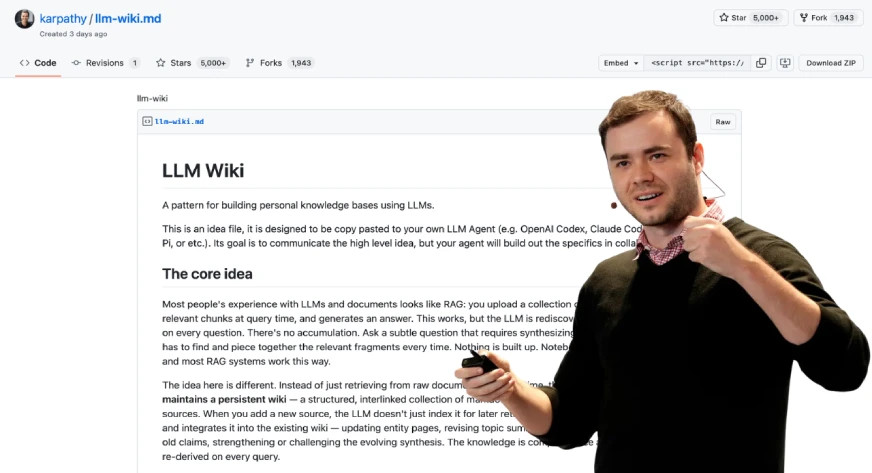
In April of 2026, Andrej Karpathy (former AI Director of Tesla and co-founder of OpenAI) suggested a solution to this issue: use a large language model (LLM) to build your wiki in real-time.

This idea became viral and was ultimately followed with a GitHub gist describing how to do this using an LLM. This guide will provide all of the support (with example code) for building your own living, evolving personal wiki.
The RAG Problem: Rediscovering Knowledge from Scratch, Every Single Time
A large number of modern AI knowledge tools use Retrieval-Augmented Generation (RAG). In simple terms, you upload documents, ask a question, and the system retrieves relevant text to help the AI generate an answer. Tools like NotebookLM, ChatGPT (file uploads), and most enterprise AI systems follow this approach.
On the surface, this makes sense. But as Andrej Karpathy points out, there’s a key flaw: the model doesn’t accumulate knowledge. Each query starts from scratch.
If a question requires synthesizing five documents, RAG pulls and combines them for that one response. Ask the same question again tomorrow, and it repeats the entire process. It also struggles to connect information across time, like linking an article from March with one from October.
In short, RAG produces answers, but it doesn’t build lasting knowledge.
Wiki Solution: Compile Knowledge Once, Query Forever
Karpathy’s approach will change the way we look at models. Rather than processing raw documents after our queries, we will now process those documents at the time of ingestion. The results of this processing will be a permanent, structured wiki-like product (which will allow you to store and retrieve documents with a high degree of control over their location).
When you add a new document source to the LLM, the LLM does not merely create an index of that source for later retrieval. Instead, the LLM reads, understands, and integrates that source into the knowledge base, updating all relevant existing pages (where necessary). It notes down any contradictions between the new and existing claims or knowledge, creating any necessary new concept pages, and reinforcing the complex relationships across the entire wiki.
According to Karpathy, “With LLMs, knowledge is created and maintained continuously and consistently rather than being able to use individual queries to create knowledge.” Here is a simple comparison that illustrates this difference further.
How It Actually Works: A Step-by-Step Guide
Let’s review how an individual would develop one of these wikis.
Step 1: Obtain your resources
You need to accumulate everything – articles that you have saved, books enjoyed, notes you have created, transcripts from discussions, and even your very own historical conversations. All these materials are your raw materials, just as ore must undergo refining before use.
One of the best practices from this community is to not treat all documents in the same fashion. For example, a 50-page research white paper requires extraction on a section-by-section basis while a tweet or social media thread only requires a primary insight and corresponding context. Likewise, a meeting transcript requires extraction of decisions that were made, action items that are to be carried out and key quotations. By first classifying the type of document will help extract the right type of information to the correct amount of detail.

Step 3: The AI writes wiki pages (Query)
You will feed your source materials into your AI’s LLM via a structured query. It will allow the LLM to produce one or more wiki pages that conform to the established template of having: a frontmatter block (YAML), a TLDR sentence, the body of the content, and the counterarguments/data gaps.

Step 4: Create an index
A central index.md will serve as a table of contents, and link directly to each page of the wiki. This is how an AI agent can efficiently traverse the entire knowledge base; it starts at the index, reads through the tldr’s, then drills down into only those pages that are relevant to its specific question.

Step 5: Record your questions
This is one of the most under-appreciated features of the system. When you ask the LLM a well-formed question and receive a response that provides valuable insight. For example, a comparison between two frameworks, or an explanation of how two concepts are related, you save that response as a new wiki page tagged with the label query-result. As time goes on, your best thinking has been collected rather than lost in chat logs.

Step 6: Conduct lint passes
At appropriate intervals, you ask the LLM to audit the entire wiki for contradictions or inconsistencies between pages, and to indicate those statements which have been rendered obsolete by a more recent source. Additionally, the LLM will provide input on identifying orphan pages (i.e., pages that have no links pointing to them), and for providing a list of concepts that are referenced within the existing content but are not yet represented by their own respective pages.

Karpathy talks about lots of specific tools in his Gist. Below you will find what each tool does and how they fit into his overall workflow.
1. Obsidian – Your Wiki IDE
Obsidian is a free markdown knowledge management application which uses a local directory as a vault. For Karpathy, this is the viewing interface used for the wiki because it has three distinct features that matter for his system:
- The Graph View provides a graph of all wiki pages represented as nodes, and in addition, every wiki link ( [[wiki-links]] ) will be represented as edges connecting all nodes together. Hub pages will be connected to many nodes, and so will be represented as larger than average nodes. Orphan pages will be represented as isolated nodes. This allows for immediate visual representation of the density of knowledge and gaps within a person’s knowledge. No other document view or file browser can provide this representation visually.
- The Dataview Plugin allows users to turn their wiki into a database that can be queried. All pages must have yaml frontmatter, so the integration specification is satisfied and therefore allows the user to run SQL-like queries against all pages in the wiki.
# In any Obsidian note, Dataview renders this dynamically:

# List all concept pages ordered by number of sources
TABLE length(sources) AS "Source Count", confidence, updated
FROM "wiki/concepts"
SORT length(sources) DESC


# Find low-confidence pages that need review
TABLE title, sources
FROM "wiki"
WHERE confidence = "low"
SORT file.mtime ASC


# Find pages not updated in the last 2 weeks
LIST
FROM "wiki"
WHERE updated < date(today) - dur(14 days)
SORT updated ASC- The Web Clipper browser extension (available for Chrome, Firefox, Safari, Edge, Arc, and Brave) converts web articles to clean Markdown with YAML frontmatter in one click, saving directly to your raw folder. You download all images to your computer by pressing the hotkey Ctrl+Shift+D after you finish clipping because the LLM requires access to the images.
2. Qmd: Search at Scale
The LLM can use the index.md file to access the wiki content without problems at small scale. The index becomes unreadable in one context window when you have more than 100 pages because it reaches excessive size.
The local search engine qmd enables Markdown file searches through three search methods which Tobi Lutke (CEO of Shopify) developed. The system operates entirely on your device because it uses node-llama-cpp with GGUF models which require no API connections and protect your data from leaving your computer.
# Install qmd globally
npm install -g @tobilu/qmd

# Register your wiki as a searchable collection
qmd collection add ./wiki --name my-research

# Basic keyword search (BM25)
qmd search "mixture of experts routing efficiency"

# Semantic search, finds related concepts even with different words
qmd vsearch "how do sparse models handle load balancing"

# Hybrid search with LLM re-ranking, highest quality results
qmd query "what are the tradeoffs between top-k and expert-choice routing"

# JSON output for piping into agent workflows
qmd query "scaling laws" --json | jq '.results[].title'

# Expose qmd as an MCP server so Claude Code can use it as a native tool
qmd mcp
The MCP server mode enables Claude Code to use qmd directly as a built-in tool which results in smoother workflow integration throughout your data ingestion and query processing tasks.
3. Git: Version Control for Knowledge
Because your entire wiki is a folder of plain Markdown files, you get version history branching and collaboration for free with Git. This is quite powerful:
# Initialize the repo when you start
cd my-research && git init

# Commit after every ingest session
git add .
git commit -m "ingest: MoE efficiency article — flags dense-vs-sparse contradiction"

# See exactly what changed in any ingest
git diff HEAD~1

# Roll back a bad compilation pass
git revert abc1234

# See how your knowledge evolved over time
git log --oneline wiki/concepts/mixture-of-experts.md

# Share with a team via GitHub (the wiki becomes collaborative)
git remote add origin https://github.com/yourname/research-wiki
git push -u origin main
Getting Started: Your First LLM Wiki in Three Steps
If you’re excited about this concept there is an easy way to begin:
- Select one area of interest you are currently exploring and give the AI 5-10 of your best sources. Do not attempt to put everything you’ve done digitally into one place on the first day but instead learn how the system works and how to use it on a small scale.
- Create the basic framework soon. Create a wiki/directory for your wiki and have an index.md file there. Write down what your frontmatter is (title, type, source, created, updated, tags), and be consistent in naming your files e.g., concept-name.md or firstname-lastname.md. If this is not done it will be difficult to rectify later.
- Spend a lot of time creating your initial prompt. This is the most critical step. Create rules for Classifying, writing TLDRs, writing the frontmatter as well as guides for when to create Pages and when to edit the pages. Make sure to keep updating the prompt as you use it.
Use Claude with Claude Code, or any AI with file access, to build and maintain the wiki. Start at your index file when querying. Let the agent navigate.
The Practical Challenges (And How to Handle Them)
Let’s be realistic, Constructing an LLM powered wiki is no easy task as it comes with several obstacles as well:
- Building an LLM-powered wiki is difficult: It involves multiple challenges across setup, structure, and long-term maintenance.
- Prompt engineering is the first challenge: You need clear instructions for structuring pages, deciding when to create vs update them, and resolving conflicting information, which requires iteration and refinement.
- Scalability is a hidden factor: Simple setups break down beyond a few hundred pages, so you need tagging, folders, and search systems planned in advance.
- Consistency over time matters: Without regular maintenance, your wiki will accumulate outdated information, contradictions, and orphaned pages.
- Agent proficiency is a key skill: Effectively guiding AI through prompts and structure takes practice, and those who invest in learning this get significantly better outcomes.
Conclusion
The most important advice for building your first LLM wiki is the same advice Karpathy gives in his gist: don’t overthink the setup. The schema template from this guide can be easily copied after which you can create the directory structure by executing the bash commands.
The system achieves its magical effect through multiple architectural improvements which develop from the first day onwards. The wiki becomes more valuable with each new source material you include. The data belongs to you. The files exist in formats which can be used by any system. You can use any AI you want to query it. The LLM takes care of all maintenance tasks instead of you needing to handle them which creates a different experience from other productivity tools.
Your knowledge, finally, working as hard for you as you worked to acquire it.
Frequently Asked Questions
A. It doesn’t accumulate knowledge; every query starts from scratch without building on past insights.
A. It processes knowledge during ingestion, creating a persistent, structured system that evolves over time.
A. It ensures the system extracts the right level of detail for each document type, improving accuracy and usefulness.

Data Science Trainee at Analytics Vidhya
I am currently working as a Data Science Trainee at Analytics Vidhya, where I focus on building data-driven solutions and applying AI/ML techniques to solve real-world business problems. My work allows me to explore advanced analytics, machine learning, and AI applications that empower organizations to make smarter, evidence-based decisions.
With a strong foundation in computer science, software development, and data analytics, I am passionate about leveraging AI to create impactful, scalable solutions that bridge the gap between technology and business.
📩 You can also reach out to me at [email protected]
Login to continue reading and enjoy expert-curated content.
