Close Menu
Scroll Tonic
  • Home
  • Smart Gadgets
  • AI & Daily Tools
  • Digital Well-Being
  • Home Office Setup
  • Productivity Apps

Subscribe to Updates

Stay updated with Smart Gadgets, AI tools, productivity apps, digital well-being tips, and smart home office ideas.

What's Hot

When product managers ship code: AI just broke the software org chart

This LG Smart Window AC with Heating and Smart Controls Is Just $400 Right Now

20+ Solved ML Projects to Boost Your Resume

Facebook X (Twitter) Instagram
Scroll Tonic
  • Home
  • Smart Gadgets
  • AI & Daily Tools
  • Digital Well-Being
  • Home Office Setup
  • Productivity Apps
Scroll Tonic
You are at:Home»Smart Gadgets»I can finally make the UI of my Series X bright pink after the new Xbox dashboard update
Smart Gadgets

I can finally make the UI of my Series X bright pink after the new Xbox dashboard update

team_scrolltonicBy team_scrolltonicMarch 19, 2026002 Mins Read
Share Facebook Twitter Pinterest LinkedIn Tumblr Email
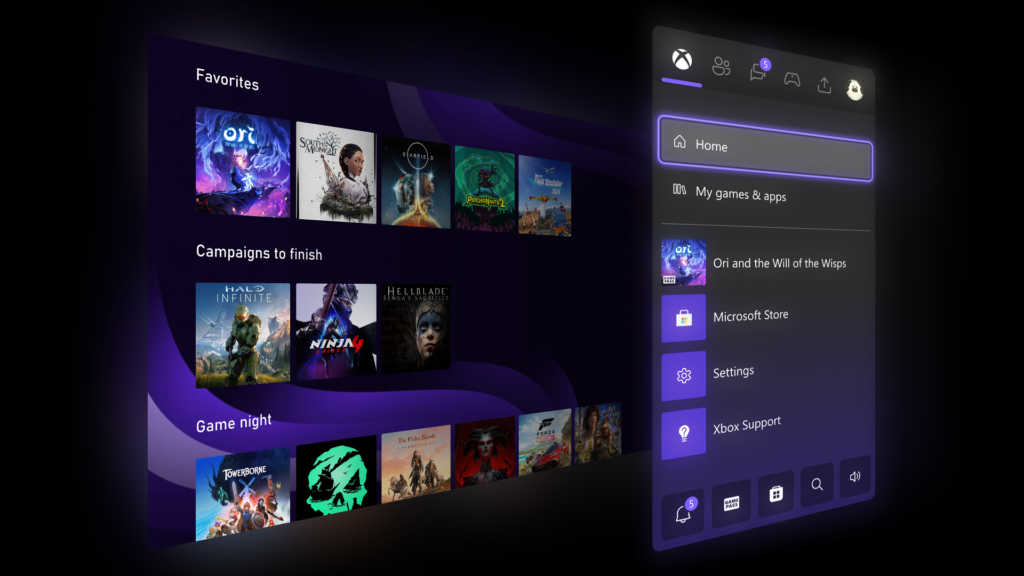
The Xbox Insiders update for console UI.
Share
Facebook Twitter LinkedIn Pinterest Email


  • The Xbox interface is getting some big upgrades
  • They’re available now to Xbox Insiders and will roll out to other users later
  • Major additions include the ability to make more folders and better color scheme customization

Microsoft has announced some big changes coming to its Xbox consoles, with the rollout starting today for Xbox Insiders before coming to all players at a later date. This includes some of the biggest changes to the consoles’ user interface in years, many enhancing customization and ease of use.

Many fans will be pleased to hear that the ability to create up to 10 groups on the home menu, up from just two previously, has been added so that you can sort your games more effectively.

You can also now finally set a custom color for the interface, rather than having to pick from the existing list of curated options. If you want to make your entire Xbox neon pink (or really any color that you can think of), you can via a new set of sliders.

Article continues below


You may like

Xbox custom color interface menu selection.

(Image credit: Xbox)

The Quick Resume feature, which helps games you’ve previously played boot up faster, is being tweaked too. From now on, you’ll be able to disable it on a per-game basis, which is surprisingly handy as some titles, particularly live-service games such as Fortnite, don’t work with Quick Resume quite as well as others in my experience.

Finally, you’ll be able to view a player’s five most recently unlocked badges when viewing their profile.

Although Quick Resume is exclusive to Xbox Series X and Series S, the other changes should also trickle down to those still using Xbox One consoles, too.


Follow TechRadar on Google News and add us as a preferred source to get our expert news, reviews, and opinion in your feeds. Make sure to click the Follow button!

Sign up for breaking news, reviews, opinion, top tech deals, and more.

And of course you can also follow TechRadar on TikTok for news, reviews, unboxings in video form, and get regular updates from us on WhatsApp too.

bright dashboard Finally pink Series Update Xbox
Share. Facebook Twitter Pinterest LinkedIn Tumblr Email
Previous ArticleApple Finally Has a Fix for Your iPhone’s Buggy Keyboard
Next Article Best Kids’ Bikes (2026): Woom, Prevelo, Guardian, and More
team_scrolltonic
  • Website

Related Posts

When product managers ship code: AI just broke the software org chart

March 30, 2026

Amazon Spring Sale: Save $500 on this Samsung 40-inch G7 gaming monitor

March 29, 2026

What Is the Best Garmin Watch Right Now? (2026)

March 28, 2026
Add A Comment
Leave A Reply Cancel Reply

Top Posts

Must-Have AI Tools for Work and Personal Productivity

February 9, 2026735 Views

Best AI Daily Tools for Notes and Task Planning

January 25, 2026730 Views

Punkt Has a New Smartphone for People Who Hate Smartphones

January 5, 2026727 Views
Stay In Touch
  • Facebook
  • Pinterest

Subscribe to Updates

Stay updated with Smart Gadgets, AI tools, productivity apps, digital well-being tips, and smart home office ideas.

Keep Scrolling. Stay Refreshed. Live Smart.
A modern digital lifestyle blog simplifying tech for everyday productivity and well-being.

Categories
  • AI & Daily Tools
  • Digital Well-Being
  • Home Office Setup
  • Productivity Apps
  • Smart Gadgets
  • Uncategorized
QUick Links
  • About Us
  • Contact Us
  • Disclaimer
  • Privacy Policy
  • Terms & Conditions

© 2026 Scroll Tonic | Keep Scrolling. Stay Refreshed. Live Smart.

Type above and press Enter to search. Press Esc to cancel.