


SharePoint Rules Just Don’t Do It for Me
Can I say that I hate the abolishment of SharePoint alerts (MC1072889, last updated 22 October 2025) and their replacement by SharePoint rules? Alerts haven’t quite gone yet, but we are well along the path to final retirement in July 2026. Starting in January 2026, Microsoft started to disable the creation of new alerts, and existing alerts are subject to a rule expiration policy which means that alerts must be renewed (“extended”) every 30 days. A non-functional alert is all too easy to miss if someone fails to extend its operation.
Seeking an Alternative
Microsoft suggests that users transition alerts to SharePoint Rules or Power Automate. They say that the removal of SharePoint alerts will “streamline and modernize user notifications. With Power Automate, organizations can benefit from an enhanced, versatile solution that goes beyond traditional alerts, offering seamless integration across Microsoft 365 services and more.”
This is so much hogwash. It is marketing twaddle at its finest and part of the general encouragement to use Power Automate, which might then lead to agents and the grand Agent 365 vision laid out at the Ignite 2025 conference.
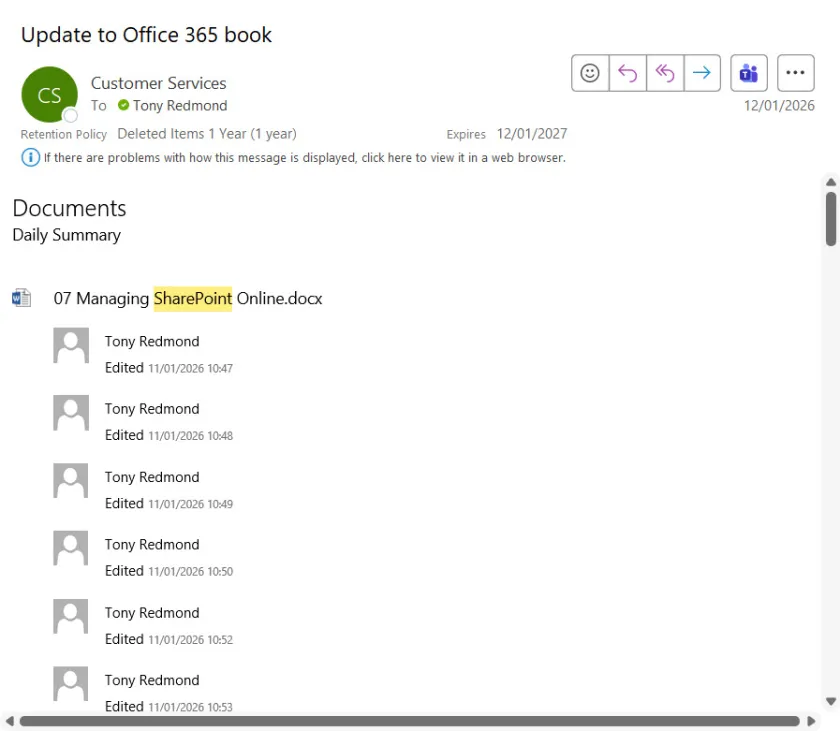
My need is straightforward and seemingly simple. I want to receive a digest via email of all the changes made to files in a document library generated daily. I use the digest to track author activity for the Office 365 for IT Pros eBook so that I know when an author has updated one or more chapters that must then be integrated into the book (Figure 1).

It is easy to create the email digest with SharePoint Alerts (Figure 2). The alert has been running without a problem for the last seven years.

Microsoft’s Suggestions Don’t Work for Me
Power Automate can do great things with data drawn from across Microsoft 365. It has very powerful capabilities in skilled hands, but it’s maybe not the right kind of tool to replace the simplicity of SharePoint Alerts for average users. As a test, I used the When an item in a SharePoint list is modified send an email template and used it to create a flow to notify me about file updates. The flow works for individual changes, but I see no way to recreate the daily digest of changes.
SharePoint Rules boasts an updated interface to replace the old 2010-style interface used by SharePoint alerts. The UX is simple to use but doesn’t seem able to create the daily digest either. I can certainly generate a rule to send email when a file is updated in a document library. However, the rule results in large numbers of messages for even short editing sessions (the flow has the same problem).
The root cause is AutoSave, a tremendous feature that removes the possibility of losing file content due to software bugs, hardware crashes, or a reboot caused by a software update. AutoSave is also the basis for collaborative co-authoring, so it’s a very powerful and useful feature. The only downside is that AutoSave creates multiple file versions during an editing session, which is why Microsoft introduced intelligent versioning to restrict the number of versions retained for files.
Look at Figure 3 – my SharePoint rule sent 71 messages to advise of changes made to files when I reviewed a single chapter to accept author changes and transpose the updates to the book.

Desperately Seeking a Digest
I’ve searched the internet to find suggestions about how to make Power Automate or SharePoint Rules create an emailed daily digest of changes made to files in a document library and haven’t found anything. Perhaps there’s someone out there who knows the magic necessary to make either do the job. If so, that would be great.
What’s annoying here is that in Microsoft’s rush to remove SharePoint Alerts, they forgot to make sure that the alternative solutions cover all bases. SharePoint Rules seems to be far more focused on handling situations that arise in Lists than file updates (I know that a file update is a list update under the covers). A new glitzy UX for SharePoint Rules and the flexibility of Power Automate are nothing to me if I can’t convert my trusty alert. And that’s a real pity.
Learn about managing SharePoint Online and the rest of the Microsoft 365 ecosystem by subscribing to the Office 365 for IT Pros eBook. Use our experience to understand what’s important and how best to protect your tenant.
