


Microsoft 365 Connector for Claude Delivers Access to Microsoft 365 Content
Following in the path of OpenAI’s deployment of a suite of connectors to make Microsoft 365 content available to ChatGPT, Anthrophic has a Microsoft 365 Connector for Claude “to securely access Microsoft 365 services (Outlook, SharePoint, OneDrive, Teams) through user-delegated permissions.” While the connector has been available to enterprise customers for some time, it is now available for all Claude plans, including its free tier and is available through the Microsoft app marketplace.
Anthrophic’s MCP Server for Microsoft 365
Anthrophic chose to use an MCP server to access Microsoft 365 workloads via delegated Graph permissions granted to the enterprise “M365 MCP Server for Claude” (07c030f6-5743-41b7-ba00-0a6e85f37c17) and the “M365 MCP Client for Claude” (08ad6f98-a4f8-4635-bb8d-f1a3044760f0) apps. Figure 1 shows some of the permissions granted to the server app. The client app is granted a custom access_as_user permission from the server app.

Claude is an MCP client that discovers tools via an MCP server. The MCP server app publishes tools to interact with Microsoft 365 like the ability to search SharePoint Online or read Teams chats. The MCP client app takes care of functions like authentication.
Permissions
At first glance, the set of permissions seems terribly extensive and guaranteed to give security teams some heartburn. Anthrophic points out that the permissions are delegated rather than application permissions. Claude’s access to Microsoft 365 content is therefore limited to whatever the signed-in user can access.
In addition, some of the permissions are needed to perform specific functions (like the Sites.Read.All permission is required to perform a SharePoint Search). They also point out that it’s possible to revoke some permissions from the apps at the expense of losing functionality in terms of connector access to Microsoft 365 content. Finally, the permissions permit read access. Claude cannot create new documents, chats, emails, or messages.
If a user is allowed to install the app, the delegated permissions are granted to that user. In the case of team or enterprise installations, the permissions are granted to a scoped set of users or everyone in the tenant.
Using the Microsoft 365 Connector for Claude
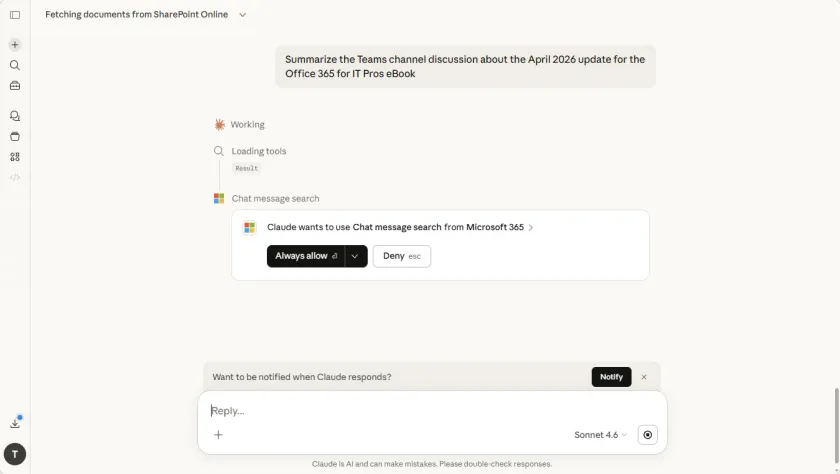
Using the Microsoft 365 connector for Claude is simple. After installing the connector, the new tools are available in chats. The first time you Claude attempts to use a tool (like the Chat message search tool shown in Figure 2), it requests permission. If you respond with “Always allow,” you won’t see the prompt again.

Prompts to the Claude app result in the tools generating appropriate Graph API requests to search for or fetch data from Microsoft 365. The retrieved information is then processed by Claude before it is displayed to the user. It’s all happens much like using any AI-powered chat app.
Figure 3 shows the results of a request using the SharePoint search tool where I asked Claude to find information about the Office 365 for IT Pros eBook. What’s interesting here is that Claude omitted details from the site where we store the source chapters for the book. That site has restricted content discovery (RCD) set to stop Microsoft 365 Copilot consuming its content when it generates responses. The nice thing is that RCD also stopped Claude (the files it found are from other sites). I expected this to happen because Claude depends on SharePoint Search and RCD works by removing documents from those search results, but it’s nice to see that the control is effective.
The information shown by Claude in Figure 3 comes from document metadata. Claude can open any of the documents it finds unless the file is protected by a sensitivity label with encryption when Claude can’t secure the required use license from the Azure Information Protection service to access the file.
Some Anthrophic Changes in the Microsoft 365 Admin Center
Meantime, if you have been using Anthrophic models with Microsoft 365 Copilot, some changes are on the way that need your attention. MC1266911 (March 31, 2026) reports that to continue use of the Anthrophic models, tenants must enable Anthropic as a subprocessor in the Microsoft 365 admin center before May 1, 2026. Making Anthrophic a subprocessor means that they comply with guidelines like the Microsoft Data Protection Addendum (DPA).
MC1269241 (3 April 2026) refers to the “Copilot in M365 apps with Anthropic models” setting in the Microsoft 365 Admin Center. When this setting is enabled, Anthropic models will be available by default for Copilot in Word, Excel, and PowerPoint. If you want Copilot users to access the Anthrophic models, the setting needs to be in place by May 4, 2026.
Microsoft 365 Connector for Claude Creates New Option
I’m sure that Microsoft will make the same points about Claude as they did when comparing ChatGPT Enterprise to Microsoft 365 Copilot earlier this year. In a nutshell, why buy an add-on that is integrated insofar as it can access Microsoft 365 data when you can buy the fully-integrated Microsoft 365 Copilot, complete with added security, control over confidential material, auditing, and other compliance features. These are good arguments that weigh heavily as companies decide which AI tools to use, but I suspect that the Claude connector will be popular with individual people who make their own choice.
Insight like this doesn’t come easily. You’ve got to know the technology and understand how to look behind the scenes. Benefit from the knowledge and experience of the Office 365 for IT Pros team by subscribing to the best eBook covering Office 365 and the wider Microsoft 365 ecosystem.
