


Viva Engage to Respect Settings in Container Management Labels
In a move that should have happened a long time ago, message center notification MC1250283 (12 March 2026) announces that Viva Engage communities will support Purview sensitivity labels. This change is not for protection (encryption). Rather, it means that Viva Engage communities will detect when the underlying Microsoft 365 groups are assigned container management sensitivity labels. If a container management sensitivity label is present for a group, Viva Engage will inherit settings from the label and apply them to the community.
The update will roll out in late March 2026 and should be available worldwide by early April 2026.
Adopting Container Management
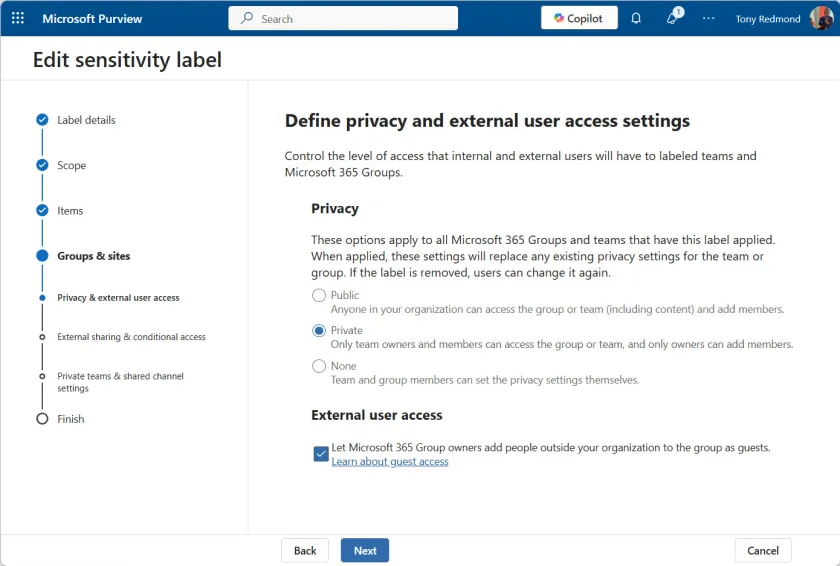
A container is a Microsoft 365 group. Sensitivity labels are often created to apply protection to files and emails, including preventing Microsoft 365 Copilot from processing sensitive content; they can also be configured with settings to control how containers operate such as privacy, external sharing, block download, and guest access (Figure 1).

Container management sensitivity labels first became available in 2021 and are supported by Teams, Outlook group, SharePoint Online sites, Planner plans, and Loop workspaces. Viva Engage is late to the party, probably because much of the time since was occupied moving old Yammer networks to native mode. Native mode is the mechanism that allowed Viva Engage to adopt Microsoft 365 groups, including dynamic groups.
Given the increasingly close relationship between Viva Engage and Teams, the need for Viva Engage to support container management became more pressing, so here we are.
Moving to Container Management
By default, nothing happens. Existing Viva Engage communities can continue to use classification labels (Figure 2), which are simple text “stickers” to help users understand the scope of a community. When container management labels are available, the community administrator can choose to use a label rather than a classification. At that point, the community inherits the privacy setting from the label. Other label settings are inherited by the community’s SharePoint Online site.

You don’t have to wait for the update to show up in your tenant before assigning sensitivity labels to the Microsoft 365 groups used for Viva Engage communities. Labels can be assigned through the Microsoft 365 admin center, SharePoint Online admin center, or with PowerShell using the Set-UnifiedGroup or Update-MgGroup cmdlets. For example:
Set-unifiedgroup -Identity 'Microsoft 365 Questions' -SensitivityLabelId 'c29e68f9-bc4f-413b-a741-6db8e38ad1c6'
Assigning a sensitivity label to a Microsoft 365 group applies settings to the SharePoint site or Planner plan associated with the target Viva Engage communities immediately. The label assignment won’t affect Viva Engage until the change to support sensitivity labels rolls out to a tenant.
Ongoing Management of Container Management Labels
Once container management labels are in use, they’ll need some management. For example, although tenant administrators can assign container management labels to communities, they cannot prevent community owners changing the assigned labels. This is also true for SharePoint Online and Teams.
If you want to be sure that container management labels “stick,” some form of monitoring is required. One approach is to use a custom attribute for groups to track the assigned label and check the assignment periodically to make sure that the correct label is still in place. The periodic check is easily done using a scheduled Azure Automation runbook, and here’s an article describing PowerShell code to check and revert container management labels if necessary.
If all you want to do is to report Microsoft 365 groups and their assigned container management labels (including highlighting of groups without labels), you can use the PowerShell script described in this article (Figure 3).

Microsoft continues to upgrade Viva Engage to eradicate the signs of the past. Another example is in MC1251200 (13 March 2026) with the replacement of yammer.com by engage,microsoft.com as the source for system-generated communications. This change should be complete by mid-April 2026. It just takes time to update software…
Support the work of the Office 365 for IT Pros team by subscribing to the Office 365 for IT Pros eBook. Your support pays for the time we need to track, analyze, and document the changing world of Microsoft 365 and Office 365. Only humans contribute to our work!
