


Reactions For All Types of Microsoft 365 Messages
The announcement about “Improved handling of disallowed and failed email reactions” for Outlook (MC1261593, 25 March 2026, Microsoft 365 roadmap item 558442) got me thinking about how reactions are transmitted and stored by Exchange Online.
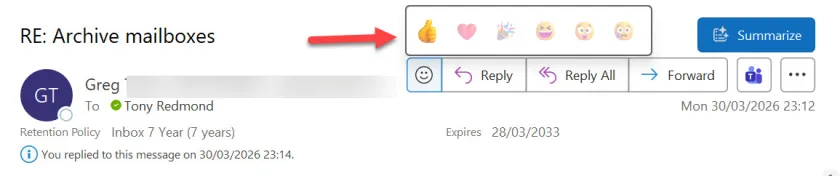
Outlook reactions have been around since October 2022. Essentially, instead of responding to a message with another message (the reply), people can respond by selecting an appropriate emoji from a set chosen by Microsoft. You cannot add custom emojis. Figure 1 shows the UI from Outlook classic.

Viva Engage also supports reactions for its conversations, as does Teams, which allows users to select from any of the hundreds of emojis available in a tenant, including custom emojis. Teams even logs a special audit event when people use reactions, which means that it’s possible to report who uses emojis in responses.
Because they are properties of chat and channel messages, Teams also supports reactions via the Graph API. However, reactions are implemented as MAPI properties called MAPIReactionsBlob and ReactionsSummary stored in messages. These properties are not surfaced through the Graph API, which makes it harder to generate reports about the usage of reactions in Outlook.
Suppressing Outlook Reactions with a Transport Rule
Anyway, Exchange Online doesn’t engage in such frippery as customizable emojis for reactions, possibly because reactions can travel outside the tenant and you wouldn’t want custom emojis being shared far and wide. Expressing emotions just six ways is sufficient to convey a response in email. Unless of course you don’t want users to use reactions.
In this scenario, you should follow create a transport rule (mail flow rule) to suppress reactions. The rule sets a “x-ms-reactions” header in email to “disallow.” A transport rule like this does the job:
New-TransportRule –Name "Suppress Outlook Reactions" –Enabled $True –SetHeaderName "x-ms-reactions" -SetHeaderValue "disallow" -FromScope InOrganization –SentToScope InOrganization
The great benefit of transport rules is that Exchange Online runs the rules as messages pass through the transport pipeline en route to recipients. If a rule says that something should be done, it will be. Transport rules are a very effective choke point. In this case, the rule inserts the x-header into any message that it processes (different criteria can be applied to dictate which messages are processed). When Outlook clients display a message with the x-header, the clients should grey out the UI that allows users to respond with reactions. No UI, no responses.
Making Outlook Classic Behave
MC1261593 tell us that Outlook classic has not supported the x-header, which is why an update is needed. Figure 2 shows a message delivered to Outlook classic with the x-header set. The user can still respond with a reaction. For messages sent from the same tenant, people who use other Outlook clients like OWA or the New Outlook won’t see any reactions that are sent for their messages because of the x-header.

According to the notification, Microsoft will release an update in public preview to stop Outlook classic ignoring the x-header in early May 2026. Assuming that nothing problematic is discovered, Microsoft will proceed to update all tenants, including GCC, GCC-High, and DoD in June 2026.
All Change In June
Although my go-to client remains Outlook classic, I must admit that I don’t use reactions to respond to email and would therefore probably not notice that Outlook classic behaves differently to the other clients. After June that won’t be the case and if you’ve implemented a transport rule to insert the x-header to suppress reactions, people who use Outlook clients might notice a change in behavior. Then again, they might not. Or might not care.
Insight like this doesn’t come easily. You’ve got to know the technology and understand how to look behind the scenes. Benefit from the knowledge and experience of the Office 365 for IT Pros team by subscribing to the best eBook covering Office 365 and the wider Microsoft 365 ecosystem.
